
Flat API Authentication
The Flat Platform API uses OAuth 2.0 for authentication and authorization. If you never used OAuth2 before, we advise you to read this great introduction. Our API supports the Authorization Code grant (with PKCE for native and mobile apps) and the Implicit grant. To simplify the usage of our API for your own account, you can quickly create access tokens in your Flat account (aka. "Personal Access Tokens").
How to quickly getting started
- Create an app for your script or project.
- Try the API in 5 minutes with a Personal Access Token for your Flat account.
- If you plan to make the app available for other people, create OAuth2 credentials for it.
Personal Access Tokens
Personal Access Tokens function like OAuth access tokens for your own account. You can generate them from your account in a few seconds:
- Create an app for your script or project
- On the left menu, click on "REST API > Personal tokens"
- Choose a name and the authorization scopes for your first token.
That's all, you can directly use our API with this token by setting it in the Authorization headers of your requests:
http
Authorization: Bearer my-api-personal-access-tokenHere is an example with cURL:
bash
curl -H 'Authorization: Bearer <my_api_personal_access_token>' https://api.flat.io/v2/meOAuth2
Create OAuth2 credentials from your app in the developer dashboard, under "REST API > OAuth2 credentials". Each credential has a callback URL, a set of scopes, and a client type that cannot be changed after creation:
- Confidential client (web app with a server): gets a client secret, shown only once at creation. Keep it on your server.
- Public client (native, mobile or desktop app): gets no secret and must use PKCE. Use it for any app that runs on the user's device, where a secret could be extracted.
Some scopes need a review by Flat before your OAuth2 credentials can request them (see Scopes). Personal access tokens are not concerned. For those, email developers@flat.io with your app and what you need the scopes for.
Here is the main information for our OAuth2 API, you can learn more about the scopes and flows in the paragraphs below.
- Authorization URL:
https://flat.io/auth/oauth - Token URL:
https://api.flat.io/oauth/access_token - Invalidation URL:
https://api.flat.io/oauth/invalidate_token - List of scopes
Scopes
Request the scopes your app needs in the scope parameter of the authorization page. Users see is the sentence shown to them on the consent page, in their language. Scopes marked Review by Flat need Flat's approval before your OAuth2 credentials can request them: email developers@flat.io. Personal access tokens are not reviewed: they can carry any of these scopes for your own account, limited to what your account itself can do.
Account
| Scope | What it allows | Users see |
|---|---|---|
account.public_profile | Provides access to the person's basic public profile. Education profiles may be anonymized with this scope; request the scope account.education_profile to access a basic education account profile. | “Access your public profile” |
account.email | Provides access to the person's email. | “Access your account email address” |
account.education_profile | Provides access to the person's basic education profile and public organization information. | “Access your education profile” |
Scores
| Scope | What it allows | Users see |
|---|---|---|
scores.readonly | Allows read-only access to all of a user's scores. You won't need this scope to read public scores. | “View all your music scores” |
scores.social | Allows posting comments and liking scores. | “Comment on and like music scores with your account” |
scores | Full, permissive scope to access all of a user's scores. | “View and manage your music scores (including updating and removing them)” |
Collections
| Scope | What it allows | Users see |
|---|---|---|
collections.readonly | Allows read-only access to a user's collections. | “View your collections” |
collections.add_scores | Allows adding scores to a user's collections. | “Add new scores to your collections” |
collections | Full, permissive scope to access all of a user's collections. | “View and manage your collections (including removing them)” |
Notifications
| Scope | What it allows | Users see |
|---|---|---|
notifications.readonly | Read-only access to a user's notifications. | “View your notifications” |
Flat for Education
| Scope | What it allows | Users see |
|---|---|---|
edu.resources | Read-write access to the resource library. | “View and manage your Resource Library” |
edu.resources.readonly | Read-only access to the resource library. | “View your Resource Library” |
edu.classes | Full, permissive scope to manage the classes. | “View and manage your classes” |
edu.classes.readonly | Read-only access to the classes. | “View your classes” |
edu.assignments | Read-write access to the assignments and submissions. | “View and manage your assignments” |
edu.assignments.readonly | Read-only access to the assignments and submissions. | “View your assignments” |
Flat for Education: organization admin
| Scope | What it allows | Users see |
|---|---|---|
edu.admin Review by Flat | Full, permissive scope to administer an organization. | “Complete admin access to your organization” |
edu.admin.lti Review by Flat | Access and manage the LTI Credentials for an organization. | “View and manage your LTI integrations and credentials” |
edu.admin.lti.readonly Review by Flat | Read-only access to the LTI Credentials of an organization. | “View your LTI integrations and credentials” |
edu.admin.users Review by Flat | Access and manage the users and invitations of the organization. | “View and manage your users' accounts” |
edu.admin.users.readonly Review by Flat | Read-only access to the users and invitations of the organization. | “View your users' accounts” |
Billing
| Scope | What it allows | Users see |
|---|---|---|
billing Review by Flat | Full access to the billing API endpoints. | “View and manage your billing details, subscriptions and invoices” |
billing.readonly Review by Flat | Read-only access to the billing API endpoints. | “View your billing details, subscriptions and invoices” |
Export tasks
| Scope | What it allows | Users see |
|---|---|---|
tasks.readonly | Read-only access to export tasks created by this account. | “Read-only access to export tasks created by this account” |
Optical Music Recognition
| Scope | What it allows | Users see |
|---|---|---|
omr | Run Optical Music Recognition jobs and download their results. The library output additionally requires the scores scope. | “Convert your sheet music images and PDFs into scores using your AI credits” |
omr.readonly | Read-only access to Optical Music Recognition jobs and their results. | “View your sheet music imports and their results” |
These tables are generated from the API on every docs deploy. Read the list at runtime rather than hard-coding it: new scopes may be added. Send x-flat-locale to get the labels in another language:
bash
curl -H 'x-flat-locale: fr' https://api.flat.io/v2/apps/oauth2/scopesAuthorization Page
Both Authorization Code and Implicit OAuth2 grants start with our authorization page. Our Authorization page (https://flat.io/auth/oauth) supports all the standard parameters from the Authorization Code grant (RFC6749/4.1) and the Implicit grant (RFC6749/4.2).
The first step is to build an authorization link where you can redirect your user. Here is a simple example:
text
https://flat.io/auth/oauth?client_id=<client_id>&response_type=(code|token)&state=<state>&scope=account.public_profile+scores&redirect_uri=<redirect_uri>You can find below the different parameters available, including non-standard and optional parameters. All of them can be passed as query string when redirecting the end-user to the authorization page.
| Property name | Required | Values and Description |
|---|---|---|
client_id | Required | The client key of your OAuth2 credential |
response_type | Required | We support code (Authorization Code grant, RFC6749/4.1.1) and token (Implicit, RFC6749/4.2.1). Use the Authorization Code grant for server-side usage, and the Authorization Code grant with PKCE for native and mobile apps. Public clients cannot use the Implicit grant. |
scope | Required | You must provide a list of scopes listed above and granted for your app, separated with a space. |
redirect_uri | Required | Determines where the response is sent. The value of this parameter must exactly match the callback URL of your credential. For a public client with an http://localhost or http://127.0.0.1 callback URL, any port is accepted. |
state | Optional | An opaque string that is round-tripped in the protocol; that is to say, it is returned as a URI parameter in the Authorization Code grant, and in the URI #fragment in the Implicit grant. |
access_type | Optional (available for the Authorization Code grant) | The acceptable values are online and offline. When specifying offline, the API will return a refresh token during the access token exchange (see Refreshing an access token). |
code_challenge | Required for public clients, optional for confidential ones | PKCE code challenge (RFC7636): BASE64URL(SHA256(code_verifier)), without padding. See Public clients. |
code_challenge_method | Optional | Only S256 is supported, and it is the default. plain is refused. |
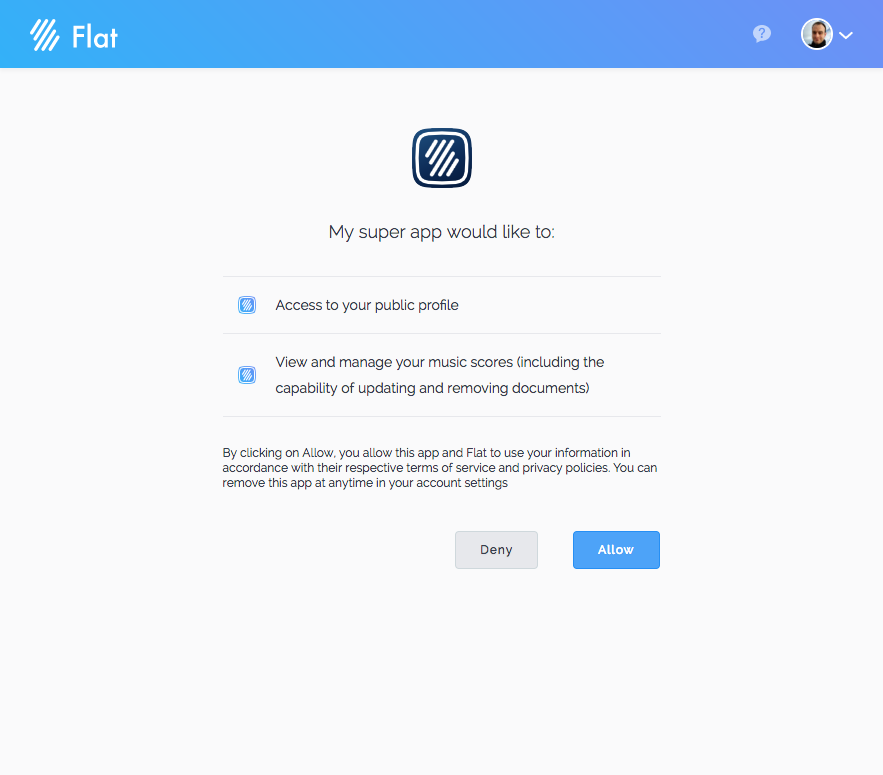
When redirecting your users to this authorization page, they will see a page that looks like the one below, where they can grant your app to access and use their account:
Authorization Code grant
Here is a typical flow of an Authorization Code grant. We advise you to use this grant for using our API in server-side.
- You redirected a visitor/user to our authorization page by specifying
response_type=code, yourclient_idand aredirect_uri. - This user granted your app on our authorization Page.
- Flat redirects your user back to your website at the
redirect_uriyou specified. You will receive acodequery string with an Authorization Code that you can exchange for an access token. This URL will also include a previousstateyou specified in the authorization page URL. (e.g.https://my-website.example.com/callback?code=<authz-code>&state=<state>) - To exchange this Authorization Code, use our Token API Endpoint,
https://api.flat.io/oauth/access_token(RFC6749/4.1.3).
Here is an exchange request example (server-side):
bash
curl -i -X POST -H 'Content-Type: application/x-www-form-urlencoded' \
 -d grant_type=authorization_code \
 -d code=<authz-code> \
 -d client_id=<client_id> \
 -d client_secret=<client_secret> \
 -d redirect_uri=<redirect_uri> \
 https://api.flat.io/oauth/access_token
And a response for this request:
json
{
  "type": "access",
  "token_type": "bearer",
  "access_token": "<access-token>",
  "issued_at": 1492542537,
  "expires_in": 86400,
  "app": "<your-app-id>",
  "appStatus": "trusted",
  "user": "<user-id>",
  "scope": "account.public_profile scores"
}
The access token is now ready to use, here is an example with cURL:
bash
curl -H 'Authorization: Bearer <access-token>' https://api.flat.io/v2/mePublic clients (native and mobile apps)
An app running on the user's device (iOS, Android, desktop) cannot keep a secret, so its credential is a public client: no secret is issued, and the Authorization Code grant must use PKCE (RFC7636). PKCE binds the authorization code to the app that asked for it: only the holder of the code_verifier can exchange it.
- Generate a random
code_verifier(43 to 128 characters fromA-Z,a-z,0-9,-,.,_,~), and keep it in memory for this sign-in. - Compute the
code_challenge: the SHA-256 hash of the verifier, encoded in base64url without padding. - Open our authorization page in the system browser (e.g.
ASWebAuthenticationSessionon iOS, Custom Tabs on Android) withresponse_type=code, yourclient_id,redirect_uri,code_challengeandcode_challenge_method=S256. Addaccess_type=offlineto get a refresh token. - Flat redirects to your
redirect_uriwith acode. Exchange it at the Token API Endpoint with thecode_verifierand noclient_secret.
Here is how to generate a verifier and its challenge in a shell:
bash
CODE_VERIFIER=$(openssl rand -base64 64 | tr -d '\n=' | tr '/+' '_-' | cut -c1-64)
CODE_CHALLENGE=$(printf '%s' "$CODE_VERIFIER" | openssl dgst -sha256 -binary | openssl base64 | tr -d '\n=' | tr '/+' '_-')
And the exchange request:
bash
curl -i -X POST -H 'Content-Type: application/x-www-form-urlencoded' \
 -d grant_type=authorization_code \
 -d code=<authz-code> \
 -d client_id=<client_id> \
 -d code_verifier=<code_verifier> \
 -d redirect_uri=<redirect_uri> \
 https://api.flat.io/oauth/access_token
The callback URL of a public client can be:
- A custom scheme handled by your app, such as
com.example.app:/oauth. A reverse-domain scheme based on a domain you own is recommended (RFC8252). Schemes handled by the browser or the system (javascript:,data:,file:,mailto:, …) are refused. - An
httpsURL, for example a universal link or app link. http://localhostorhttp://127.0.0.1, for desktop apps listening on a local port. Any port is accepted at authorization.
Since another app could claim the same custom scheme or local port, users see the consent page on every sign-in when the callback URL is not https, even if they authorized your app before.
Refreshing an access token
Access tokens expire after 24 hours (expires_in, in seconds). When the authorization was requested with access_type=offline, the token response also contains a refresh_token that you can exchange for a new access token (RFC6749/6):
bash
curl -i -X POST -H 'Content-Type: application/x-www-form-urlencoded' \
 -d grant_type=refresh_token \
 -d refresh_token=<refresh-token> \
 -d client_id=<client_id> \
 -d client_secret=<client_secret> \
 https://api.flat.io/oauth/access_token
Public clients send their client_id without a client_secret.
Each refresh returns a new refresh_token and invalidates the one you sent, so always store the latest one. Refresh tokens of confidential clients don't expire. Refresh tokens of public clients expire after 30 days (refresh_token_expires_in, in seconds); after that, the user signs in again.
Implicit grant
Here is a typical flow of an Implicit grant. This grant is available to confidential clients only. For an app running on the user's device, prefer the Authorization Code grant with PKCE. We main difference with the Authorization Code grant is that you don't need to exchange a code, you directly get the access token in the URI Hash.
- You redirected a visitor/user to our authorization page by specifying
response_type=token, yourclient_id, and aredirect_uri. - This user granted your app on our authorization Page.
- Flat redirects your user back to your website at the
redirect_uriyou specified. You will receive the access token in the URI Hash (see example below).
text
https://my-website.example.com/callback#scope=account.public_profile&expires_in=86400&access_token=<access-token>The access token is now ready to use, here is an example with the JavaScript Fetch API:
javascript
fetch('https://api.flat.io/v2/me', {
  headers: {
    'Authorization': 'Bearer ' + ACCESS_TOKEN
  }
})
.then(function (response) {
  return response.json();
})
.then(function (me) {
  console.log(me);
});
Tokens revocation
This OAuth2 API supports token revocation (RFC 7009) at the following endpoint: https://api.flat.io/oauth/invalidate_token.