
OMR Interactive Jobs API
The Interactive Jobs API exposes Flat's Optical Music Recognition (OMR) pipeline directly through the /omr/jobs endpoints. Use it when you need more than a one-shot import: live progress, an optional review step to confirm the detected instruments, incremental capture (add pages one by one, ideal on mobile), or MusicXML output without creating a Library score.
If you just want a score in the Library from a single PDF, the Auto simple import is fewer calls. New to OMR? Start with the OMR overview for scopes, credits, and error codes.
TIP
The Playground in the developer dashboard runs this pipeline on one of your files, review step included, and charges credits like the API does.
Job lifecycle
A job is a small state machine. You create it, start it, optionally answer interactive steps while it runs, and read the result when it is done.
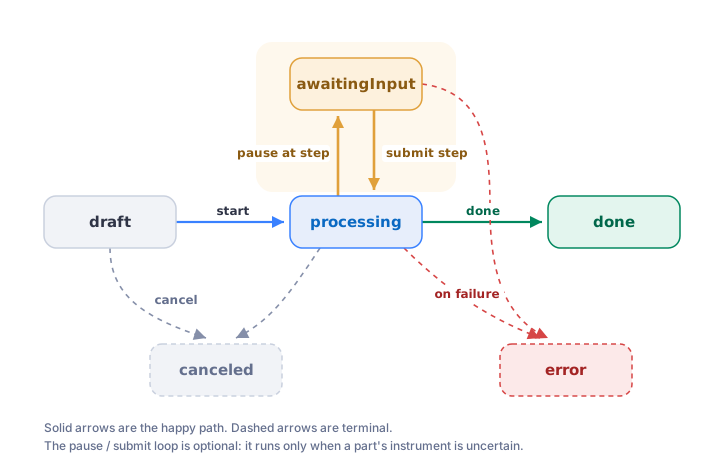
status | Meaning |
|---|---|
draft | Created; files can still be added. Not started or charged yet. |
processing | The pipeline is running. See progress. |
awaitingInput | Paused on currentStep, waiting for you to submit it. |
done | Finished. See result. |
error | Failed. See errorCode and errorMessage. |
canceled | Canceled by the client. |
In this page:
- Prerequisites
- Draft vs one-shot
- Step 1. Create a draft job
- Step 2. Add files
- Step 3. Start the job
- Step 4. Follow progress
- Step 5. Review detected instruments
- Step 6. Get the result
- One-shot import
- Exports
- List and resume jobs
- Cancel a job
- Errors
Prerequisites
Every request needs the omr scope (with a Personal Access Token or an OAuth2 token). With the default output: library, the job creates a score, so an OAuth2 token also needs the scores scope. output: musicxml only needs omr. See Authentication and scopes.
The examples below use these variables:
bash
export TOKEN='<my_api_personal_access_token>'js
const TOKEN = '<my_api_personal_access_token>';
const auth = { Authorization: `Bearer ${TOKEN}` };
python
import base64, time, requests

TOKEN = "<my_api_personal_access_token>"
auth = {"Authorization": f"Bearer {TOKEN}"}
Draft vs one-shot
There are two ways to create a job:
- Draft (this walkthrough): create an empty job, add files one at a time, then start it. Best for multiple images or incremental mobile capture, where pages arrive over time.
- One-shot: send the files inline with
autoStart: truein a single request. Best for a single PDF or a straightforward third-party integration.
Both produce the same kind of job. Pick whichever fits how your client captures files.
Step 1. Create a draft job
Create the job with POST /omr/jobs. Omit files to get a draft. Declare the interactive steps your client can render in interactiveSteps (here, details); the pipeline pauses only at the steps you list and auto-resolves the rest, so future steps never break an older client.
bash
curl -X POST "https://api.flat.io/v2/omr/jobs" \
  -H "Authorization: Bearer $TOKEN" \
  -H 'Content-Type: application/json' \
  -d '{
    "output": "musicxml",
    "interactiveSteps": ["details"],
    "locales": ["en"]
  }'
js
let res = await fetch('https://api.flat.io/v2/omr/jobs', {
  method: 'POST',
  headers: { ...auth, 'Content-Type': 'application/json' },
  body: JSON.stringify({
    output: 'musicxml',
    interactiveSteps: ['details'],
    locales: ['en'],
  }),
});
let job = await res.json();
const jobId = job.id;
python
job = requests.post(
    "https://api.flat.io/v2/omr/jobs",
    headers=auth,
    json={"output": "musicxml", "interactiveSteps": ["details"], "locales": ["en"]},
).json()
job_id = job["id"]
locales tells the recognition pipeline which languages to read lyrics and text in. It does not affect the notation. Build your picker from localesDetails on GET /omr/capabilities rather than hardcoding a list, and note that an unsupported language yields garbled lyrics rather than an error. See Which languages are supported for lyrics?
The response is a job in draft:
json
{
  "id": "665f3a1c9b2e4a0012ab34cd",
  "status": "draft",
  "output": "musicxml",
  "interactiveSteps": ["details"],
  "locales": ["en"],
  "creationDate": "2026-07-08T09:24:00.000Z"
}
This example uses output: "musicxml", which only needs the omr scope and lets you download the result directly. To import the result into the Flat Library instead, set output: "library" (the default), add the scores scope, and use collection to target a specific collection. Pass idempotencyKey to make retries safe (a repeated key returns the existing job).
Pages are recognized in the orientation they are uploaded in, which is right when your client lets the user rotate pages before upload (a document scanner does). When it does not, for example a server-to-server integration importing scans as they come, set autoRotate: true and the server corrects pages uploaded sideways or upside down before recognition. Small tilt correction always runs.
Step 2. Add files
Add one image or PDF per call with POST /omr/jobs/{job}/files. Files keep their upload order. The file is Base64-encoded in file.
bash
curl -X POST "https://api.flat.io/v2/omr/jobs/$JOB/files" \
  -H "Authorization: Bearer $TOKEN" \
  -H 'Content-Type: application/json' \
  -d "{ \"file\": \"$(base64 < page1.jpg | tr -d '\n')\", \"filename\": \"page1.jpg\" }"
js
import { readFileSync } from 'node:fs';

res = await fetch(`https://api.flat.io/v2/omr/jobs/${jobId}/files`, {
  method: 'POST',
  headers: { ...auth, 'Content-Type': 'application/json' },
  body: JSON.stringify({
    file: readFileSync('page1.jpg').toString('base64'),
    filename: 'page1.jpg',
  }),
});
const { fileCount } = await res.json();
python
with open("page1.jpg", "rb") as f:
    payload = {"file": base64.b64encode(f.read()).decode(), "filename": "page1.jpg"}

added = requests.post(f"https://api.flat.io/v2/omr/jobs/{job_id}/files", headers=auth, json=payload).json()
The response reports the assigned index and running count: { "fileIndex": 0, "fileCount": 1 }. Provide either a filename with a recognizable extension or an explicit mimeType; if the type cannot be determined from either, the call returns 400 (OMR_MIME_REQUIRED). Repeat for each page.
Upload order is page order, and there is no reorder parameter, so let the user settle the order before you start uploading. On mobile, the platform's on-device document scanner gives you that pass for free, along with cropping and perspective correction. See Capturing on mobile.
Step 3. Start the job
Start processing with POST /omr/jobs/{job}/start. This validates the files, runs the permission, quota, and credit checks, charges the page-based credits, and queues the job.
bash
curl -X POST "https://api.flat.io/v2/omr/jobs/$JOB/start" -H "Authorization: Bearer $TOKEN"js
res = await fetch(`https://api.flat.io/v2/omr/jobs/${jobId}/start`, { method: 'POST', headers: auth });
job = await res.json(); // status: "processing", estimatedCredits: N
python
job = requests.post(f"https://api.flat.io/v2/omr/jobs/{job_id}/start", headers=auth).json()The job returns as processing with estimatedCredits set to what was charged. A start with no files returns 400; insufficient credits or quota returns 402, and the account needs more credits.
Step 4. Follow progress
Poll GET /omr/jobs/{job} to track the job. Optionally pass wait (0 to 25 seconds) to long-poll: the call returns as soon as the state changes (or live progress advances), then you call again. This keeps progress live without a tight loop.
While processing, the job carries a progress object with a percent, a localized text, and a stable key you can map to your own stepper UI. The pipeline runs roughly OMR_QUEUED, OMR_DETECTING_STAVES, OMR_READING_NOTES (or OMR_PROCESSING_PAGE, both carrying current and total page parameters), OMR_ASSEMBLING, then OMR_CREATING_SCORE. New keys may be added, so match the ones you handle and keep a generic fallback.
The job's page in the dashboard shows the same progress live.
bash
# Returns as soon as the state changes, or after 25s.
curl -H "Authorization: Bearer $TOKEN" "https://api.flat.io/v2/omr/jobs/$JOB?wait=25"
js
async function pollUntilSettled(jobId) {
  while (true) {
    const res = await fetch(`https://api.flat.io/v2/omr/jobs/${jobId}?wait=25`, { headers: auth });
    const job = await res.json();
    if (job.status !== 'processing') return job; // awaitingInput, done, error, canceled
    console.log(job.progress?.percent, job.progress?.key);
  }
}
python
def poll_until_settled(job_id):
    while True:
        job = requests.get(f"https://api.flat.io/v2/omr/jobs/{job_id}", params={"wait": 25}, headers=auth).json()
        if job["status"] != "processing":
            return job  # awaitingInput, done, error, canceled
        print(job.get("progress", {}).get("percent"), job.get("progress", {}).get("key"))
The job settles into awaitingInput (if a detection needs your review), done, or error.
Step 5. Review detected instruments
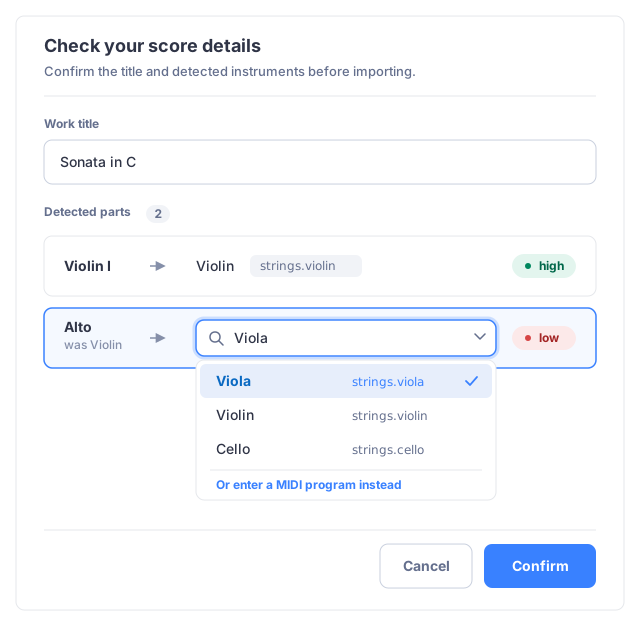
If you declared details in interactiveSteps, the job may pause at awaitingInput after recognition, with currentStep: "details", so you can review low-confidence detections. It may also resolve automatically and continue straight to done, for example when every part is recognized with high confidence. Always handle both outcomes: after processing, a job can be awaitingInput or already done.
When it does pause, pendingStep.data holds the detected title and instruments for review (the "check your score details" screen). A paused job can also be reviewed and resumed from its page in the dashboard:
json
{
  "id": "665f3a1c9b2e4a0012ab34cd",
  "status": "awaitingInput",
  "currentStep": "details",
  "estimatedCredits": 3,
  "pendingStep": {
    "step": "details",
    "data": {
      "step": "details",
      "title": "Sonata in C",
      "instruments": [
        { "index": 0, "partName": "Violin I", "instrumentId": "strings.violin", "instrumentName": "Violin", "midiProgram": 40, "resolvedConfidence": "high" },
        { "index": 1, "partName": "Alto", "instrumentId": "strings.violin", "instrumentName": "Violin", "midiProgram": 40, "resolvedConfidence": "low" }
      ]
    }
  }
}
To show the pages being reviewed, fetch each input image by index with GET /omr/jobs/{job}/files/{index} (0-based; returns the input page as an image).
Present these to the user, then resume the pipeline by submitting your corrections to POST /omr/jobs/{job}/steps/details. Send only what you change: omitted fields keep the detected values. Here we fix the second part and tidy the title:
bash
curl -X POST "https://api.flat.io/v2/omr/jobs/$JOB/steps/details" \
  -H "Authorization: Bearer $TOKEN" \
  -H 'Content-Type: application/json' \
  -d '{
    "step": "details",
    "title": "Sonata in C major",
    "instruments": [
      { "index": 1, "instrumentId": "strings.viola" }
    ]
  }'
js
res = await fetch(`https://api.flat.io/v2/omr/jobs/${jobId}/steps/details`, {
  method: 'POST',
  headers: { ...auth, 'Content-Type': 'application/json' },
  body: JSON.stringify({
    step: 'details',
    title: 'Sonata in C major',
    instruments: [{ index: 1, instrumentId: 'strings.viola' }],
  }),
});
job = await res.json(); // status back to "processing"
python
job = requests.post(
    f"https://api.flat.io/v2/omr/jobs/{job_id}/steps/details",
    headers=auth,
    json={
        "step": "details",
        "title": "Sonata in C major",
        "instruments": [{"index": 1, "instrumentId": "strings.viola"}],
    },
).json()
The job resumes and re-runs only the cheap assembly and finalize stages. Poll again (step 4) until it is done.
Correcting a part
Each override in instruments[] is matched to a detected part by its index. To set the instrument, use either of these (you do not need both):
instrumentId: a Flat instrument ID such asbrass.horn. Browse the Instrument IDs catalog, or resolve IDs programmatically with the@flat/instrumentspackage.midiProgram: a General MIDI program number (0 to 127), resolved server-side. Handy when you would rather not map Flat instrument IDs.
If both are sent, instrumentId wins. You can also set partName and transposeKey (a pitch class like F or Bb, for transposing instruments) independently. At the submission level, title and mainLanguage (BCP 47, overrides the job locale for lyric and text reading) apply to the whole score. This is the natural place to let a user correct the language after seeing the detected title. See What do locales and mainLanguage actually do?
Step 6. Get the result
When the job is done, result tells you what is available:
json
{
  "status": "done",
  "result": {
    "exports": ["musicxml", "mxl", "midi"]
  }
}- With
output: musicxml(used above), the result stays out of the Flat Library. You download it directly as a file (MusicXML, MIDI, and more) from the exports endpoint. Use this when your integration keeps files in its own system and does not need a Flat score. - With
output: library(the default), the result is imported into the user's Flat Library as a score.result.scoreholds the new score ID. Fetch it withGET /scores/{score}, and it behaves like any other Flat score. You can still download the raw files from the exports endpoint.
One-shot import
To skip the draft sequence, send the files inline with autoStart: true. The job is created, started, and charged in one call, returning 202 with a processing job. This is the simplest path for a single PDF when you do not need to add pages incrementally.
bash
curl -X POST "https://api.flat.io/v2/omr/jobs" \
  -H "Authorization: Bearer $TOKEN" \
  -H 'Content-Type: application/json' \
  -d "{
    \"output\": \"musicxml\",
    \"autoStart\": true,
    \"files\": [ { \"file\": \"$(base64 < score.pdf | tr -d '\n')\", \"filename\": \"score.pdf\" } ]
  }"
js
res = await fetch('https://api.flat.io/v2/omr/jobs', {
  method: 'POST',
  headers: { ...auth, 'Content-Type': 'application/json' },
  body: JSON.stringify({
    output: 'musicxml',
    autoStart: true,
    files: [{ file: readFileSync('score.pdf').toString('base64'), filename: 'score.pdf' }],
  }),
});
job = await res.json();
python
with open("score.pdf", "rb") as f:
    files = [{"file": base64.b64encode(f.read()).decode(), "filename": "score.pdf"}]

job = requests.post(
    "https://api.flat.io/v2/omr/jobs",
    headers=auth,
    json={"output": "musicxml", "autoStart": True, "files": files},
).json()
From here, follow progress (step 4) as usual. If you also declared interactiveSteps, the one-shot job still pauses for review.
Exports
Once a job is done, download the result in any available format with GET /omr/jobs/{job}/exports/{format}. The Content-Disposition header carries a filename derived from the resolved work title.
format | File | Content type |
|---|---|---|
musicxml | Uncompressed MusicXML (.xml) | application/vnd.recordare.musicxml+xml |
mxl | Compressed MusicXML (.mxl) | application/vnd.recordare.musicxml |
midi | Standard MIDI (.mid) | audio/midi |
thumbnail.png | PNG preview of the first page | image/png |
bash
curl -H "Authorization: Bearer $TOKEN" \
  "https://api.flat.io/v2/omr/jobs/$JOB/exports/musicxml" -o score.xml
New formats may be added over time, so request the format your client supports. result.exports lists what is available for a given job.
List and resume jobs
GET /omr/jobs lists the caller's jobs, newest first, with an optional status filter and cursor pagination via the Link response header. Use it to resume an interrupted job or clean up abandoned drafts. The Jobs view of the dashboard shows the same list.
bash
curl -H "Authorization: Bearer $TOKEN" "https://api.flat.io/v2/omr/jobs?status=draft"Cancel a job
POST /omr/jobs/{job}/cancel cancels a job that is not being actively recognized: a draft, a queued job, or a job paused at an interactive step (awaitingInput). Any credits charged at start are reversed.
bash
curl -X POST "https://api.flat.io/v2/omr/jobs/$JOB/cancel" -H "Authorization: Bearer $TOKEN"Only a job the worker is actively recognizing cannot be canceled; that returns 409 (OMR_JOB_NOT_CANCELLABLE), so poll and retry if needed. Canceling a job that is already done, error, or canceled is a harmless no-op.
Retention and deletion
Flat does not keep your uploads forever. A job created with output: musicxml holds its files and results for 30 days, then they are erased.
Read the exact window from retentionDays on GET /omr/capabilities, and each job's own deadline from retention.expiryDate. The deadline is fixed when the job is created, so a later change to the retention window never moves it. Erasure runs as a periodic pass, so data is removed shortly after expiryDate rather than exactly on it.
Jobs created with output: library have no retention object at all. Their result is a score in your library, so it follows the library's lifecycle instead.
Collected what you need? Erase it right away with DELETE /omr/jobs/{job}:
bash
curl -X DELETE "https://api.flat.io/v2/omr/jobs/$JOB" -H "Authorization: Bearer $TOKEN"The job itself stays listable with the status it finished with, and records retention.expiredDate. The call is idempotent, and returns 409 for a job that has not finished (OMR_JOB_IN_PROGRESS) or one that imported into the library (OMR_JOB_NOT_EXPIRABLE). The job's page in the dashboard has an Erase files now button that does the same.
The originals, recognition results, and processing logs all live under a single dedicated prefix in our object storage, and that prefix is deleted outright at expiry. We keep no backups or replicas of it. What remains is a stripped job record for accounting and history: id, dates, status, page and file counts, file size, MIME type, and billing information. No filename, no checksum, no document content. See the privacy and data FAQ.
Downloads and exports of an erased job return 409 (OMR_JOB_EXPIRED). Branch on the code rather than the status: OMR_JOB_NOT_DONE is worth retrying, OMR_JOB_EXPIRED is permanent. To list by retention state, filter on expired, alongside status if you like:
bash
curl -H "Authorization: Bearer $TOKEN" "https://api.flat.io/v2/omr/jobs?status=done&expired=false"Errors
See the OMR overview for the shared errorCode list and the common HTTP statuses. The job lifecycle adds these request errors:
| Situation | Status | Code |
|---|---|---|
Adding a file to a job that is no longer a draft | 400 | OMR_JOB_NOT_DRAFT |
| Adding a file whose type cannot be determined | 400 | OMR_MIME_REQUIRED |
| Submitting a step whose body and path disagree | 400 | OMR_STEP_MISMATCH |
| Submitting a step the job is not awaiting | 409 | OMR_NOT_AWAITING_STEP |
| Submitting a step for a job whose task can no longer resume (for example a concurrent cancel) | 409 | OMR_JOB_NOT_RESUMABLE |
Downloading an export before the job is done | 409 | OMR_JOB_NOT_DONE |
| Canceling a job the worker is actively processing | 409 | OMR_JOB_NOT_CANCELLABLE |
Related
- OMR overview - scopes, credits, capabilities, and error codes.
- Auto simple import - the fewest-calls path to a Library score.
- FAQ - credits and billing, limits, recognition quality, and commercial use.
- Instrument IDs - the catalog used to correct detected parts.
- API Reference: OMR.