

Teachers
Prep scores, arrange parts and build exercises with a dedicated app window and desktop-speed editing. Everything syncs to the account your students already use.
Who it's for
One account across the room, installed where each person works best.
Prep scores, arrange parts and build exercises with a dedicated app window and desktop-speed editing. Everything syncs to the account your students already use.

The same Flat for Education you deploy district-wide, now installable on staff machines. One account, managed the way you already manage it.

Write and edit notation on a school or home computer, with playback and the tools they know from the web.
The editor
Everything the Flat for Education editor does on the web, in a focused desktop app.
See everything in the editor
Articulations, lyrics, chords, slurs, transposing parts and clean engraving.

Hear your score as you write it.

Bring in MusicXML and MIDI; export print-ready PDF, MusicXML and MIDI.

Enter notes with a USB or Bluetooth MIDI keyboard.

Sign in and your full library is there — on the web and on the desktop.

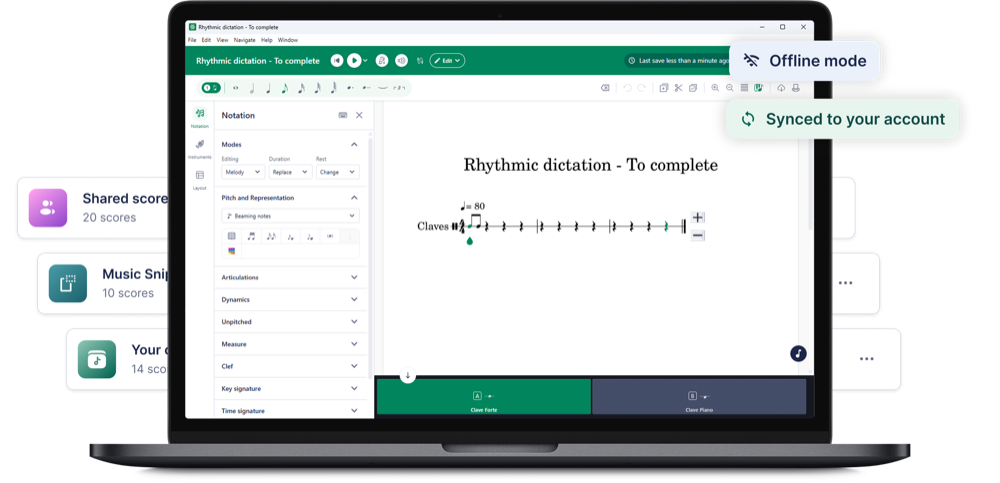
No Wi-Fi in class? Keep editing; your changes sync back when you reopen the app online.
Offline-first
Is your classroom connection dropping in and out? Keep composing and editing in the desktop app. Your work is saved right on the computer, with no connection needed.
The next time you open the app online, your offline changes sync straight back to your Flat for Education account.
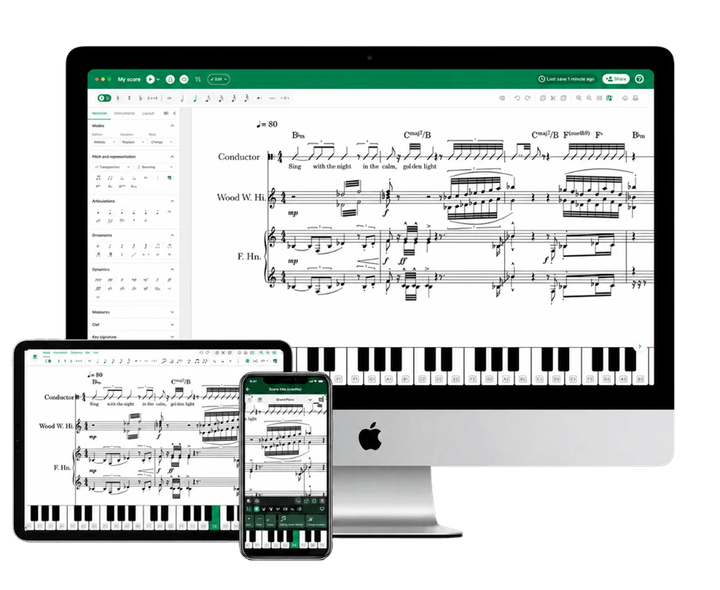
Cross-device
Put the editor on the lab machines, the staff laptop, and a student's home computer. There's no per-seat install limit. Your Flat for Education account is the single source of truth, so anyone can sign in and pick up exactly where they left off.

Getting started
Get started in minutes. Download the app for macOS or Windows and install directly on your device.
Sign in to your Flat for Education account.
Every score, assignment and class syncs across your devices automatically.
Don't have an account yet? Start a free trial and the download will be waiting in your dashboard.
Same Flat for Education account. Now on Mac and Windows.